
Archive for September, 2004
Drew Carey’s Green Screen
 I always loved “Drew Carey”. It never expected to be more then it was, and it was always fun and silly.
“Whose line is it anyways” was funny for season one but quickly all of Wayne Bradey’s show dominating sketches sounded the same. I was a little bummed to hear it was cancelled, but then the other night I saw the end of a commercial for “Green Screen”, but gave it not thought. Tonight I saw it again, and it looks like a really fun show.
It is basically “Whose Line” wide 3D graphics. So all of the actions that the guys are acting out will be digitally morphed in, I would guess live. For those of you who don’t like animation on top of live motion, at least this won’t expect to be more than something fun. Plus, they can stretch the medium to use to their advantage, not just support them, but to push it to the limit.
Upcoming Comic Based Movies for 2004
I was checking online today on one of my favorite sites for comic news, comicscontinuum.com and came across some photos for the Fantastic Four movie that is supposed to be coming out next July.
Now, even though I am a comic freak, I am a purest, and do believe in making good movies, not movies just because the characters are well known to make a buck. Doing that damages the public perception of the characters and comics in general as a visual storytelling medium.
That is why, giving credit to Sam Raimi’s amazing treatment of Spiderman I have to say that most comic directors could learn so much from Bryan Singer, who has directed the X-Men films. He is a true director. He seems things from a real perspective, has such a attention to detail, and makes these characters relatable and believable, which you cannot put a price on.
I won’t pass judgment on the Fantastic Four movie, but I must say looking at the costumes and looking at the talent, it looks like a “bang for the buck” kind of movie. Jessica Alba is Sue Storm, who is hot, but if that is all the movie has, then sad is hardly the appropriate word.
I recently saw the trailer for Sin City that aired at the San Diego comic con. Oy!
I am an artist, and am all for staying true to the work, but like I say to all you book lovers out there, suck it up or shut up! A book is a different medium than a movie. Although I don’t prefer books, I don’t say, “oh, the book just wasn’t as good as the movie.” The different tools you have for each medium do not translate back and forth.
Frank Miller is working closely to develop Sin City which looks like a damn comic book. It’s overly stylized, and I believe, judging by the precise replica of the scenes in the comic that this movie will flop, only appealing to fan boys.
An artist gets too close to his work, and can’t see that it is a life of it’s own and can be shaped into any number of things. So, enough about this rant. I hope both of those movies are good, because we are getting to a point of obnoxiousness.
It was about this time ten years ago when Super Hero films were more prevalent, but there was no heed of quality vs. quantity, and then Batman and Robin came out. I love Batman, and will give most films a break. But Joel Shumacher, he must live is life in one fruity little shoe. Signaling the downfall of public opinion, we are just now getting good stores back.
Beware, all of you Catwoman’s and League of Extraordinary Gentlemen, don’t hurt us all for a quick fix to your money addiction.
Trip to Chicago to see Sarah’s cousin and the Varners.
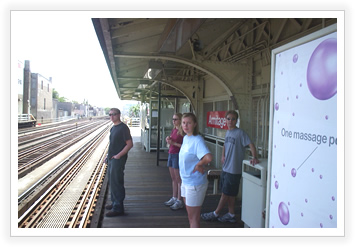

The Varners got married in early June, and wanting to see how married life was treating them, we arranged a trip to stay with Sarah’s cousin Tim Gallagher in Chicago.
It was a lot of fun. Friday we got there really late, and I got to see Barry Bond’s 700th homer. Then, we went out and met one of Tim’s roommates at the bar. Packed, but fun, it was a lot like old times. When we got back, we stayed up till 4:30 just talking.
Saturday we met up with Sarah’s sister Emily, who is going to Riverforest Chicago, downtown. Above is a picture of us just before getting on the “el”. We learned the “el” was finished in 1897, just 26 years after the great fire in Chicago that nearly wiped the city out. We went to the Museum of Contemporary Photography, to the Celtic Fest, and through Millennium Park.
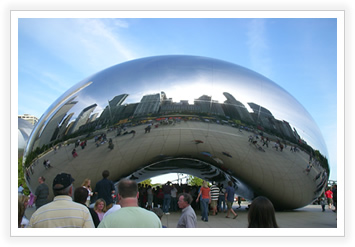
In Millennium Park, there is this enormous Chrome freestanding sculpture called “The Bean” as it looks just like one. Funny to think about, it was really breathtaking to see the skyline reflected in it from every direction.
Later that night we went to Second Hand City, and saw some very politically charged sketch comedy in this run down old stage room. Apparently John Belushi and Ed Ashner started there. I wasn’t all that thrilled, but worth a try once.
Sunday we slept in for a little while. We went to the Chicago zoo, and later we went to Emily’s campus and saw where she was staying and met some of her friends. We finished the night off at Olive Garden before finally getting home at 2 a.m., ouch!
Dodgeball : A True Underdog Story (2004)

This is a fun movie. Ben Stiller starts out really funny as this over the top macho gym guy. By the end of the movie, you feel like the end of every one of his other movies, irritated like nails on a chalkboard.
But a movie about one of the greatest childhood games ever, is really enjoyable, in particular, a sequence during the training of the underdog “Average Joe’s Gym” team that involves wrenches, balls, and incessant hits on the characters.
Vince Vaughn is his goofy self, and Christine Taylor (The Wedding Singer)is the hot girl with the smokin arm. There are the predictable parts, but it is fun to watch all of the bizarre cameos that have become a part of the ring of movies done by Ferrell, Vaughn, and Stiller. From Shatner to Chuck Norris, they’re all there.
Everybody Loves Raymond
 It was the first of an all new fall season on CBS.
Like many shows, I came in on Raymond kind of late in the game. Watching for three years now this is the start of the final season after eight years total. It was a great one.
Marie and Frank are moving, and they “break” it to the kids. The moment every single audience member has been secretly praying for, the celebration that the nightmare of your parents across the street is finally over.
Debra has a moment where she almost messes things up, but Marie grounds her, and nothing like classic style Barone to take the sentimental edge off any touching event. A good lead to what promises to be a final funny season.
Two And A Half Men
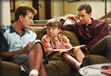 Sarah and I watched Raymond last year and got suckered into the TV ploy, hanging on to watch a new show after a well established one. Starring Charlie Sheen as a shovenistic male pig, a real stretch, the show is about him, his brother and his brother’s son who is the humorous child’s perspective on a womanizing household.
A first episode with star talent in Elvis Costello and Sean Penn, this episode didn’t really have a lot to it, but didn’t stray far from the formula that has worked so well in the past. The brother has self esteem issues with his divorce and tries to get into Charlie’s support group. Just as you think there is some kind of bonding between the brothers, the moment is broken with a wedgie.
CSI : Miami
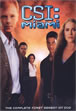 CSI is another show that we were lazy and didn’t turn off one night, and got sucked into. But it is just that, alluring. With Jerry Bruckheimer’s name all over it, this show always keeps you guessing and has enough turns to keep you satisfied to the end.
The season opener started with a bang, with one of the main members of the CSI team, “Speed” getting shot and dying.
The one thing that I don’t like about these dramas is that because they tell such dense stories, they have no time for character development. But having said that, this episode was really touching, and not just a marketing gimmick, to see this character die. Mostly, to see the effect it has on the other cast members.

