
Archive for May, 2005
The Ring 2 (2005)

When Sarah and I rented “The Ring” a year and a half ago, we didn’t know what to expect. We were scared out of our minds, where we couldn’t even pee alone that first night. Nonetheless, even though I don’t enjoy movies that scare me, it was a really different and the story was really interesting. The second part ties everything together.
The story is about Noami Watts (mother) and her son, who are looking to make a new start. They are scarred from their experiences involving a deadly video tape and a little girl that was murdered. Just as they think they are in the clear, the little girl finds them.
If you haven’t seen the first movie, the basic premise is that there is this video that teenagers are passing around and watching. Seven days from the time you watch the video, you die. This time round though, the consequences are a little more dire. I really could go on and on about the second part of the movie here, but you really have to see the first part to understand.
The little girl that is the ultimate evil in these stories is looking to take over the son’s body and become a real child again, to have a new mother. Watts has to convince those around her she isn’t crazy, or abusive to her son, as well as figure out a way to get him back before time runs out.
There is plenty of suspense, from the two messed up faces that are the trademark from the first movie, to a scene where the car Watts is driving is viciously attacked by large deer, about 20-30 of them to be precise.
Not a movie for children, although some stupid parents brought them anyways, I think you have to be a certain type of person to like this movie. But the idea of a deadly video tape, with some very bizarre footage on it, some haunting music, and some interesting use of cut footage make this movie intriguing to those who like interesting cinematography.
Robocop (1987)

I gave this movie the rating I did largely because of how I remember it. I had seen this in the mid 90’s as a TV edited version, and I loved it then. But now looking at it, you see how the dated the movie is, and how far we’ve come in technology since then.
The movie is about Murphy, a cop that is viciously killed in the line of duty. His timing is just right that the police department of the future is looking for something less human and breakable in the form of a complete robot or a cyborg. The full monstrous robot Ed 209 is a disaster, killing everyone in sight, so Murphy because a cyborg robocop.
He then spends the rest of the movie in self discovery, reversing his brain washing, and killing off all of the bad guys that killed him first. Pretty simple.
Graphic in many senses even by today’s standards, I don’t think I would recommend many people to see this movie. There was one part that scared me so bad the first time I saw it, and that was TV edited version, that I had to fast forward through this time again. But the idea is pretty cool and the Robocop design is really awesome. This is kind of a classic in a sense, so maybe check it out for the whole campy futuristic ideal is portrays in the movie.
Night Shift (1982)

Old but funny, this movie may be dated, but if you are a fan of Michael Keaton, he comes out in full swing in this movie.
Along with Shelley Long(Cheers) and Henry Winkler(Happy Days), this movie is about two guys who turn their night shift at the morgue into a prostitution ring. Now, that may sound really bad, but the movie stays on the surface of the dirtiness of the whole thing. Winkler lives next to Long, who is a hooker, and her pimp was just murdered. She and the rest of her friends are without a pimp, and Winkler is smitten with Long, so he offers to help them out.
Keaton is the brains behind the whole thing, and the driving force of the movie, as Winkler is a push over. Keaton is the jittery funny man who is throwing parties in the morgue, driving kids to their proms in a hurst, and slew of other really bizarre things.
Not exactly a family movie, but if you like Keaton this is a must. And of course, if you can overlook some of the content of the movie. I am a fan, and I hate old movies.
A Sunday at the Indianapolis Museum of Art





I heard at work about the Grand Re-opening of the IMA, that admission for the weekend was free and that there was some extraordinary exhibit with robots that worked.
Sarah heard about it also so we took a day to go.
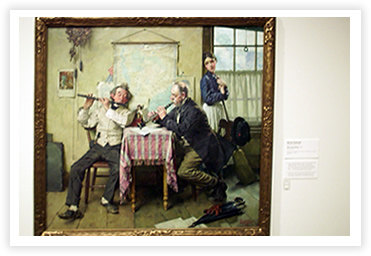
The Musuem, like I mentioned earlier in the blog, is really awesome. It is funny that after I am out of school, then I am interested a little more for my own knowledge in the history of art. As you see, there is a photo of the Norman Rockwell, and then just one sculpture. Most of the other photos I took were of my own personal interest.
The rest of the photos are of the gorgeous Lilly Estate that we visited second. I just can’t describe in words this place, you really got a sense of their wealth, giving, and just what it would have been like to live such a well treated life. I personally liked it for the history of Indy and how that fit into the puzzle, but there was so much there to be enjoyed. From the great views from the windows, to the ornate design inside the house and wide open rooms, I was really enamored.
The Row of trees you see in the one photo really is like all of the movies from the south on the plantations, with rows of trees and one long drive up to the house sitting on the back center of the property.
Superman: Red Son
I’m FINALLY getting around to writing something for the blog that’s not about a road trip! It’s been so beautiful outside it’s hard to want to sit at a computer. But that’s all about to change – MWHAHAHA! (That’s my best evil laugh.)
I now possess a LAPTOP! Excuse me a minute while a do a little “happy dance”. All I need is to set up a wireless connection & tonight we take over the world! Whoops – I was channeling the Brain there for a minute. See what happens when you capriciously use the evil villain laugh?
I’m going to write about Superman today – which is just nuts because Superman does nothing for me. I get easily bored with stories that are nothing but “I’m very strong so I stopped a bad thing from happening.”
However there is one thing about Superman that I find endlessly interesting. Superman: Red Son is an entire book is devoted to the exploration of this certain idea, so it got all the synapses in my brain fired up. I just LOVE that! That’s still the best part of reading comics for me – when you find a story that makes you think.
So, what’s this notion to which I’ve alluded? I like stories when Superman struggles with the concept of being god, or even a Christ-like figure, if you prefer. In his heart he just wants to “save” people. The interesting part lies in the struggle to decide by what means you choose to achieve it.
You have all this strength & power, so do you help those you love more by a life of service? Or do you better protect them by using this power to control the best possible outcomes because you are clearly best suited for the task?
Red Son explores this idea in a “what if” tale. I know – don’t balk yet. I have also read some SUPREMELY sucky “what if” stories, but I really dug this one. Mark Millar provides us an interesting premise: What if Jor-L had launched his son at a slightly different time & the rocket crashed in Russia instead of the US-of-A?
So we take all that earnest desire to help mankind & bring it up in a Russian farming collective. Neat, huh?
This book juxtaposes our familiar heroes with real historical characters & events. It does a great job of showing how this change affects not only the fictional characters that populate the story, but also how it might have affected the world.
Everybody’s there too. Even though the characters take different paths – they are still true to the essence of the characters we’ve come to know.
Superman needs his foil – so a tragic loss in the life of a young boy in Russia leads to the creation of a Soviet version of Batman. Wonder Woman joins Superman for a while and then begins to wonder if the Batman was right to question his benevolent domination.
Metropolis still has its Daily Planet, but Jimmy Olson has moved on to other things. Lois is, OF COURSE, there (and so is the chemistry!), but this Lois is married to Lex Luthor. The Luthor in this world devotes his life to putting his not nearly so evil genius to work to find a way to bring down Superman.
However, this time it’s not so much for personal gain, power or vengeance but rather for the preservation of ideological principles. Lex & Superman serve as opposing answers to the question of “How do you go about saving the world”?
Jeff and I talked about this a little at lunch one day. He asked me what the big deal was. What difference could landing in Russia make? I think I had a moment of clarity on the matter so let’s see if I can recreate, eh?
Our American Superman is a product of a culture that prizes individuality. Any time Clark stops to consider the notion that maybe he should just take over – he remembers why he loves humanity so much. It’s in large part due to their free will & indomitable independence.
An American upbringing provides him with a context for understanding that if you kill free will you crush the thing you love. It’s worth preserving that even if you are forced to occasionally let others make bad choices.
Now take that same Boy Scout heartfelt desire to help, and then raise it in a society where control is the norm & collective thinking your daily bread.
The Man of Steele grew up in Stalin’s heyday in Red Son. He was reared in an environment where the government assured you they had everything under control & would take care of all the citizens.
It’s only natural that this cultivated feelings that the best way to protect the world was to “take care” of it. Unfortunately the cost of Superman’s Utopia is free will.
It’s this realization that allows Lex to finally defeat Superman in the end. The final standoff between this alternate reality pair and Lex’s delivery of the ultimate checkmate should not be missed.
I can only WISH that I was clever enough to come up with such an engaging tale. Thank God there are people out there providing thes great stories for us. Treat yourself to a copy of this book. Heck – you can borrow mine!
More half baked opinions coming soon…thanks for reading!!
Later!
Man of the House (2005)
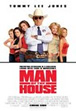
This was a funny, enjoyable movie.
Tommy Lee Jones stars opposite five very self aware, cute college cheerleaders who witness a murder. As a result, he is charged with guarding them and keeping them hidden until he and the rest of his police unit can figure out who the killers are.
The movie is such a trip because Tommy Lee is a no-nonsense, lonely man who has forgotten how to interact with society, women, and even his daughter. (I know, what I would perceive to be a REAL stretch for his true persona) He is stuck watching over these girls who insist on dressing skimpy, talking big, and generally getting into a lot of trouble.
Watch this movie. I think there is a little humor in it for everyone, both of the sexes, but maybe not little kids. The penultimate part is when Lee goes off to the store to get “monthlies” for the girls. All you see is this enormous wall of products as tall and wide as the eye can see, and the camera switching back and forth to this dried up old man (Lee) with a painfully confused look on his face. He then asks another female character which ones to get, the regular ones or the ones with the wings. The delivery is priceless.
Lemony Snicket’s – Series Unfortunate Events (2004)

I was pleasantly surprised by this movie. Turned off by how incredibly childish the Harry Potter Movies are, I watched this movie largely in part to see Jim Carrey. But soon I was taken in by the imagination and the life the story possessed.
The three Baudelaire children are orphaned in the beginning of the movie, and sent away to live with their peculiar and very evil uncle Count Olaf. They then exchange the hands of two other misanthrope relatives as Count Olaf chases them around in hopes of expiring them. Each time, the children are resourceful and witty enough to come out on top. My favorite child being Sunny, the little baby biter, and the increasingly funny dubbed over sounds that she makes throughout the movie.
Another role that was particularly fitting for Carrey, he isn’t over the top, but I imagine plays the part perfectly, as well as two other great disguises. But, this does have a distinctly Carrey feel, so if you enjoy his acting, check this flick out. But, I can’t really figure out who wouldn’t enjoy this movie, even just a little bit. If you don’t have an imagination, then pass. But the cool animals, the peculiar characters, and the “Hardy Boys” approach the children take to getting out of sticky situations is particularly entertaining.
Oh, and this series, blows Harry Potter out of the water.

