
What is a 3ds Max Gizmo? How do I turn on, or turn off a Gizmo in 3ds Max?
When I first started in 3ds Max, I started hearing about “gizmo” this and “gizmo” that. I have found even in After Effects, this is a popular term when talking about transformation tools. Gizmo to me seems like an afterthought of what they decided to name something late into the development process.
Basically, a gizmo is a little helper for when you are transforming (rotate, scale, move) an object in your viewing plane, or orthagonal view.
In 3ds Max, there are three views, X = Horizontal, Z = Vertical, and Y = Forward and Back in dimension space. This may be hard if you are new to a 3d modeling program, but a 3 dimension space is what this type of program is all about, hence 3d.
So, when you choose one of your transform tools, (again scale, rotate, move or something else) a little 3d dimensional crosshairs comes up to help you know which direction you are applying your transform in. Each direction has it’s own color, X = Red, Z = Blue, and Y = Green.
Without getting into an in depth explanation of how gizmos work, I just want to say that they are extremely helpful for making a shape change to the way you want it. I had some problems one day because when I was using my transform tools, the gizmos weren’t showing up. I had to go hunting to try to figure out how to turn my gizmos back on.
So, to turn on your gizmos, if they aren’t already.
Step 1: Go to Customize > Preferences
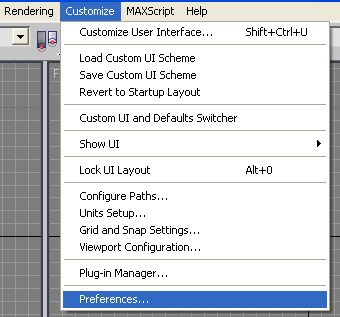
Step 2: In the preference dialog box you will see many tabs. Click on “Gizmos”
Step 3: Click “On” to turn your gizmos back on. You can see the option here in the upper left.
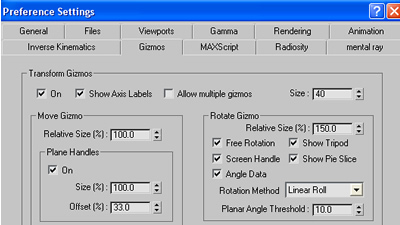
Simple, but yet when you are in such a complex program, finding something out simple like this, without knowing where to go can be very hard.
Here are some similar arcade posts
- Changing shortcuts / Customize shortcuts in 3DS Max
- How do I change the background matte color when working in Photoshop? How do I change the gray color in the gutter area of Photoshop?
- Shortcut to switch through Photoshop tools
- Using the “Fit Canvas” shortcut.
- How do I save my action files? How do I bring / import my actions into a newer version of Photoshop?
If you enjoyed this post, please consider to leave a comment or subscribe to the feed and get future articles delivered to your feed reader.
Comments

No problem….I try to write about things that I also have issues with when I can’t find them in searching.
I was having issues with this when I was working in 3DS Max, so I am glad someone else got some benefit out of this.

I’m new to 3dsmax too but just want to share a shortcut that does this in a second. To turn on or to turn off your gizmo you just press keyboard “X” in your 3dsmax … and woala it’s on or eventually off 😉

Thank you so much. I do not know how my gizmo got turned off but I knew I could not work without them. All I could think of was to reinstall 3ds max. I am so happy that you took the time to help people out. God Bless You!

Thanks to both Jeff and Drax. Would have been a good thing for them to put into Essential Skills Movie Tutorial #2.
Thanks for the note.
You’d think….but when you work on something that much, maybe they’re too close to 3DS Max to know any better.


I cant see the type in dialog box but my gizmo are all turned on. Any suggestion to avail the dialog box to be viewable.
Bong, I no longer use 3DS Max, nor do I have a seat installed, so I wouldn’t be able to help you with this, sorry. Hopefully someone else who has commented on this thread can help you out.


merci beaucoup, urs guidance with the pics. helped me to discover the gizmo, thanks a lot. i’ll be back with new doubts 🙂

thankyou so much I’ve been searching for ages about how to turn the gizmos back on! I found how all about axis constraints on! I didn’t want the cross hairs it was frustrating!
Thankyou!


Hey sometimes it doesnt work, in that case you can get in view menu & make SHOW TRANSFORM GIZMO ON that’s it.

Thankss dude, it was really messing up with my mind and i was unable to do my work properly in 3ds max..thnks a lot..:)
Sorry, the comment form is closed at this time.


February 23, 2009
thank you soooo much i couldn’t figure out why my gizmo’s weren’t showing up because i had them set to on in the view menu but this fixed it im a beginner but am learning fast and the gizmo’s help enormously lol