
Arcade Resources
Updates on Mr. Do! leads
I finally heard back from Mark Deroller, and after a lot of searching through years of past emails, he can’t find contact information for the people that bought his Mr. Do! over five years ago. So as of right now, I consider that white Mr. Do! lead dead. I am back to looking through links of arcade collectors sites, hoping to find a collector who has a website with photos of this Mr. Do! that hasn’t made a predominant profile on one of the major coin-op collecting databasing sites.
As for the white Mr. Do! that Rob Carroll auctioned on ebay, the buyer finally came and picked it up. His name is Bruce Kubu, and I have gotten his contact information from Rob. Bruce and I have been in touch, and after a couple of follow ups, he sent me some photos of the remaining Mr. Do! cherries at the top of the curve of the bezel, the last piece I was missing. I hope to trace that before the week is up, and finally finish the white Mr. Do! bezel nearly 5 months after I started piecing it together.
So what is next in finding out more about the rare white Mr. Do! with sideart? I am not sure. Wait for an ebay auction of the machine to pop up? Check with Walt Glassett again to see if he has any leads? Call Universal Games directly to see if I can track down exactly what Gleeb was? I don’t know. I will cross that bridge when I get to it, and I get the motivation.
Mr. Do Illustrated Sideart History

Mr. Do is quite a popular, classic game. Play it once and you will be hooked. For that reason, it appears that any original versions of this game are hard to come by. The popularity of the game drove it to have one of the most popular and successful conversion kits ever made and as a result, most of the Mr. Do games you come across and conversions. I have seen a ton of them in the cabinets with the presidential wood siding venire. They have everything, the marquee, the control panel artwork, but they have nothing on the sides, which, for a guy who loves sideart is really disappointing.
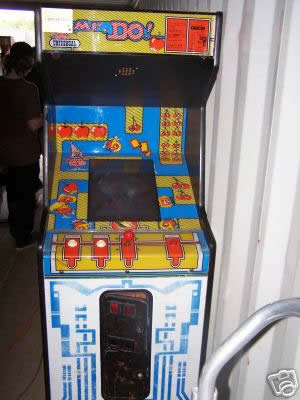
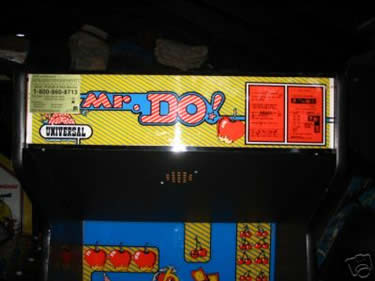
Here’s a little other bit about the game’s history. Apparently even what I thought was the original cabinet from Universal, isn’t even true. If this is even true (skeptical) the original Mr. Do had a black joystick, and came from Japan. Most of the common ones were made by Universal in a very similar looking cabinet, but were actually conversions from another game called Lady Bug, and had an orange joystick. Therefore the true-true original Mr. Do’s out there are even that much more scarce. Check out photos below of the most familiar Mr. Do cabinet.
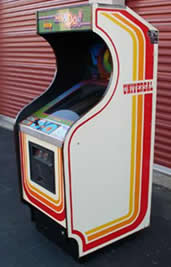
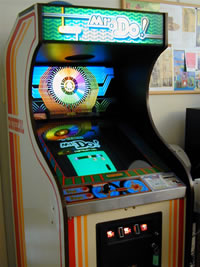
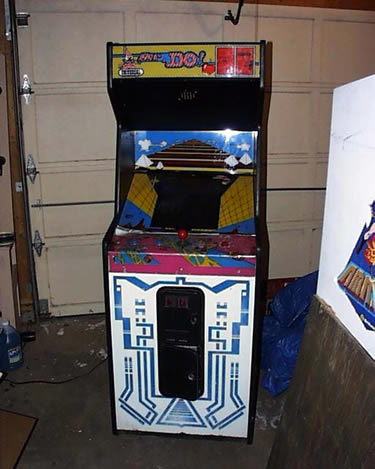
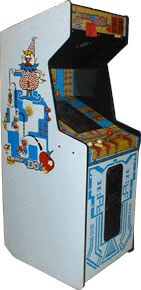
Which brings me to the “White Sideart” version. I found out about this version / artwork in October of 2006. A friend of mine forwarded me an auction on ebay for a Mr. Do with some strange artwork on the side that I had never seen before. I didn’t think much of it, kept an eye on it, but it was about in Mass., so that would be quite a distance for this game.
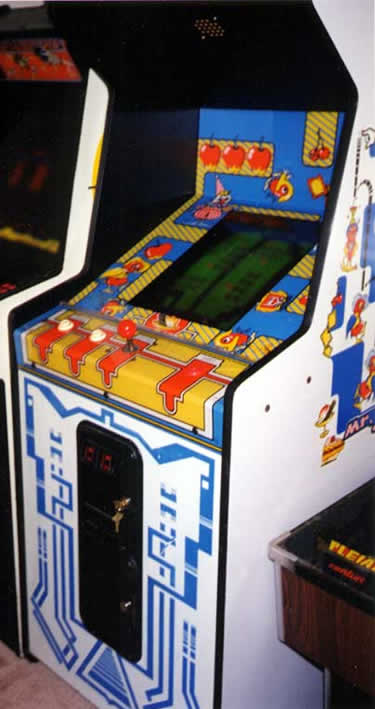
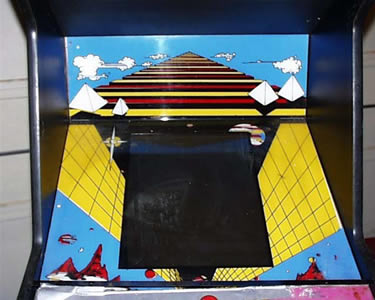
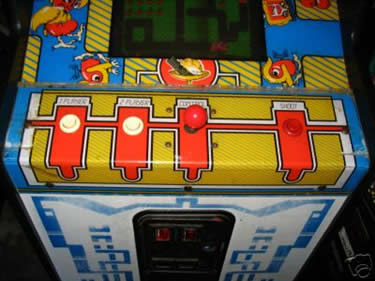
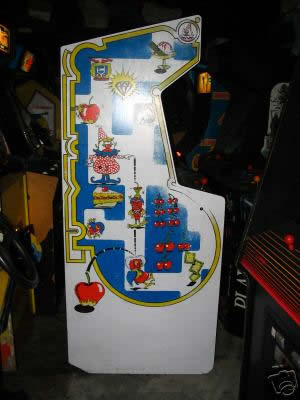
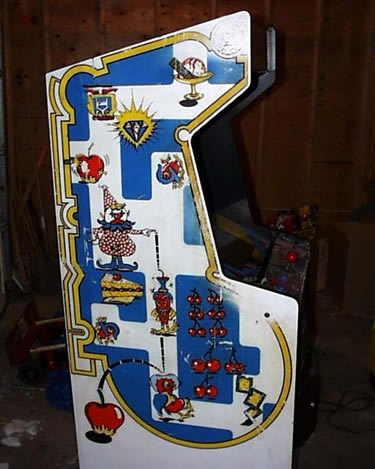
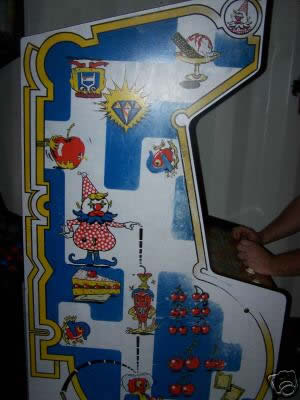
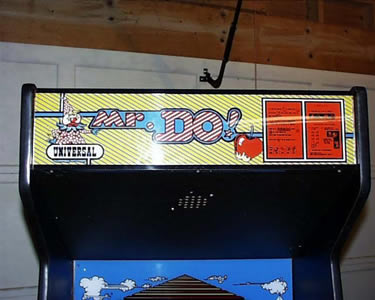
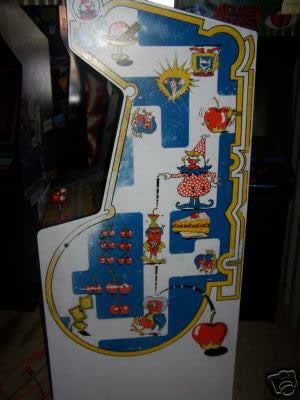
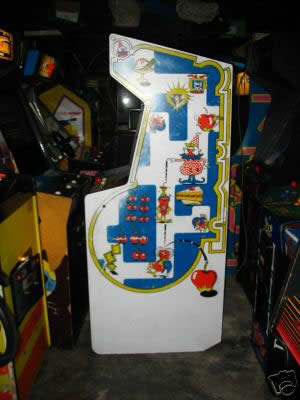
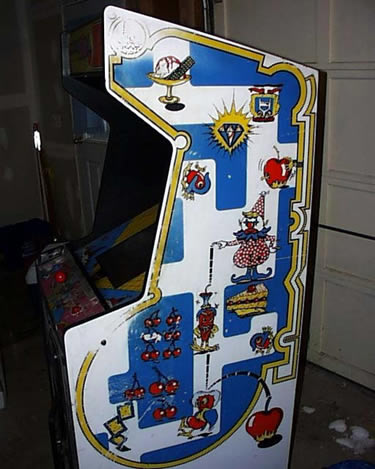
Now, like I mentioned above, there were some conversion kits out there, possibly for both versions of the game, the white sideart and the regular version that most commonly had the green marquee. Some of the white conversion kits were more thoroughly applied than others, because the kit came with sideart but finding a machine with it applied is difficult. The artwork was printed on white with Mr. Do and his enemies in a maze like pattern with the cakes and fruits from the game. It is pretty different looking but I do like sideart, and in a way, I like this just as much as the original because the original was void of any real artwork other than the red lines on the side of the cabinet.
These are the photos that I have found so far of this cabinet. They are a little more plentiful in photos then they are in finding actual owners. Right now I know of none.
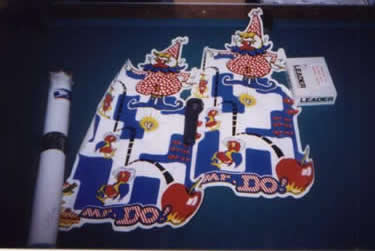
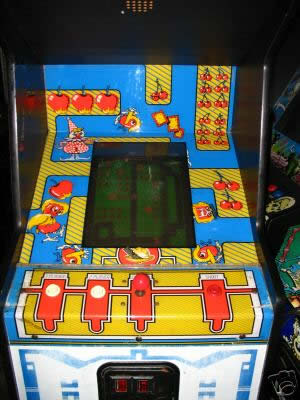
Please Contact Me With Information
If you own, or know anyone who owns one of these, or just know some more of the history of this particular version, I would love to know more. I would look to buy, but that is not the main idea. Most people who have rare, or hard to find games aren’t looking to just sell.
What I am looking for, is someone who would be willing to take some hi-res photos of the different pieces of artwork so that I can trace them in Illustrator and reproduce them for my own machine, and only my own machine.
However, as of this writing in February of 2007, I haven’t found a site that has the art, or anyone who is talking this much about this one piece of artwork. If you know that to not be true, please, drop me a line.
Update: July 2013 I now have photos from inside two different Ladybug machines, machines that have very similar painted illustrated artwork to the white Mr. Do!, that show Universal serial numbers. Check out this post on two different factory Mr. Do!s.
Jr. Pac-man truck update
Well. As I thought, it is taking longer for the truck to get here than planned. In theory I may have had the machine today, but that is fine. I get to keep my money longer and have more time to try to sell the R-Type.
The main reason it is taking longer is the generous and expanded route by DanOfEarth. He is having Troy swoop way south to Atlanta and back up the east coast. My guesses are that he should be up to PA sometime in the first few days of next week. That would put my machine here probably in a week from Saturday or Sunday…maybe:)
I am just worried now, with the expanded route, that something might happen to the machine, or they might run out of room. That would be even worse.
R-Type wiring diagram – Adding older monitor without isolation transformer
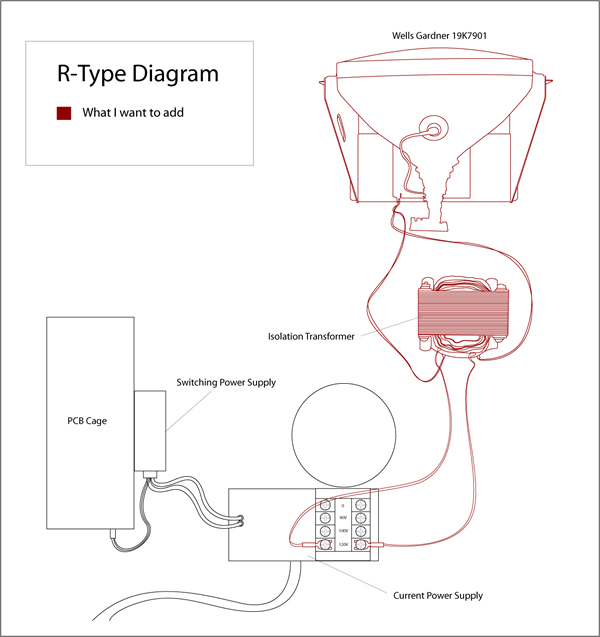
I am trying to make sense of how to wire up a spare monitor to my R-Type, so I can keep my Vision Pro before I sell the machine. The vision pro is a nice new monitor, and it also has an isolation transformer built onto the chassis. In the diagram below I have drawn what I already have, and how I am hoping to attach another monitor.
Bob Roberts said this in two emails;
First Email –
You need a 1:1 isolation xformer to run your monitor. The pic you have is of power entrance with an auxiliary outlet & a switcher.
I don’t know if there are different versions of isolation transformers, and if the most common ones are 1:1, but right now, I am assuming the most common transformer is 1:1.
Second Email –
No… you can’t tie in to the AC in feed. You have to have the 1:1 output isolated & there is only one place with 2 terminals to hook that up to without regard to polarity since AC has none.
In the first email I thought I described that I would put an isolation transformer directly off the power supply, and then from the transformer I would run my two power lines. But knowing how crappy some of my emails are sometimes, I must not have done a good job explaining which is my bad.
His second email I take away that I need to have some sort of polarity based voltages, and AC doesn’t have that. Like, I would need +120V and -120V, and this is just +120V directly to the monitor.
It’s a gift that Bob even responded to my emails with an explanation, he sells parts, he isn’t a tech support guy or something. So again, a big thanks out to Bob Roberts and his big heart for helping the lowly collectors trying to figure things out.
I don’t understand the polarity part, so I am posting to the klov group to see if they can help me and explain it a different way.
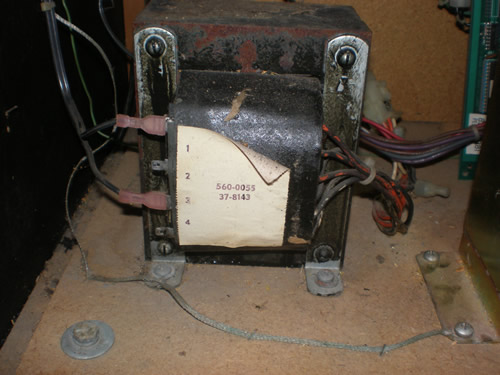
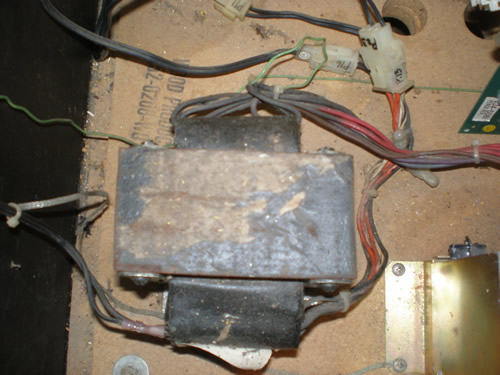
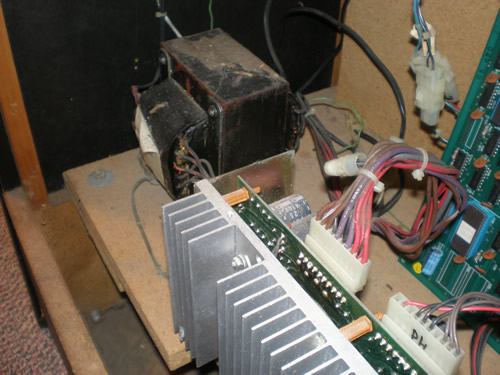
Photos of Sega Pengo Isolation Transformer
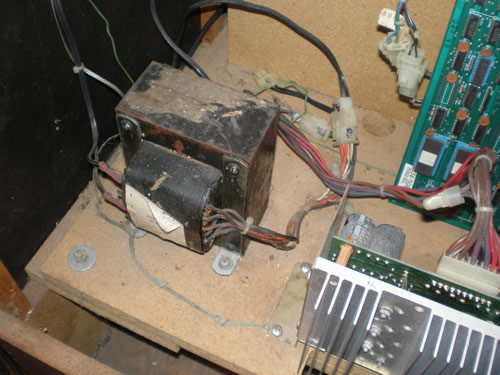
Photos of the isolation transformer. Pretty old and crappy looking like most of these from the 80’s, but how it looks isn’t an indication of how it works. I just need to figure out what voltages are going in these wires from the Power Supply so I can tie in a switching power supply instead.
Happ Vision Pro 19″ Monitors – $130-$135 Sale
I heard this on the forums and decided to check into it for my Pengo at the local HAPP rep by my work. Well, as of June 30th, they shut down that location. Crap….
So I did get contact information for the sales rep who is now based out of their house in Greenfield. She said the sale is until the end of Sept. 30, ’07 and they are $135 a piece, or $130 if you buy four. Pretty good deal if you ask me. Shipping she estimated at around $20, so that would put a brand new monitor at my house, in 2-3 days for about $155. Tempting.
Rick Ford may try to help walk me through how to do a switcher in the Pengo, so I will try to exhaust my understanding of that route first since it should be cheaper. But I have until the end of Sept. to think about getting a new monitor for a great price.
Space Invaders Boards in the mail
I dread sending large boxes in the mail, many-fold.
- First, I have to find the time during working hours to get over there.
- Second, a lot of times it is crowded when you make it just before the end of the day, so you have to wait forever.
- Third, I never have boxes around the house to put larger objects (like arcade game PCBs) in for mailing.
- Fourth, if I even have supplies to wrap the game boards up nicely, then I have to cover the whole box with wrapping so that no wrapping is showing.
- Fifth, it is relatively expensive to mail any classic arcade items, let alone PCBs.
But, the box with the Space Invaders PCBs is out, and I hope when it comes back, I am done with this game completely. It is becoming like the Dig Dug. I am approaching a year with this arcade game, and I don’t know what I have learned. Other than, be very careful when it comes to buying classic games if it looks like there is a board issue.
Don’t get me wrong. Alex Yeckley of Elektronforge has been great so far. He does excellent work, and he is pretty affordable if you buy the arcade game machine cheap or want to keep it. He is fast, he does ok on email, and he stands behind his work.
I at least I supposedly have a buyer, and although I am getting close to my investment threshold for what the Space Invaders Deluxe is actually worth, I am not totally tapped out and I have confidence the buyer will come through.

