
Archive for August, 2005
Guinevere (1999)

Hoo boy. This one was a little weird, and probably extremely weird if you are not an artist, nor have watched many movies about artists. Starring people you’ve never heard of, nor will again, this movie is about a young 21 year old girl who is enticed by a 38 year old photographer. She sons becomes his “Guinevere”, or his muse in a sense. The become aromatically involved, and she is an apprentice of art, learning some sort of artful skill.
Twisted not only because of the age difference between the two, you soon find out this girl is the fourth of fifth in a line of women who “Connie” has taken on. He takes in these scared and confused women and tries to open their eyes through emotional turmoil and some mind games. The whole movie is real, and that works to it’s benefit sometimes, because it doesn’t seem like acting. But at other times, like when a whole section of Connie’s bridge breaks off when he is eating, because he has poor dental health makes it a less than entertaining movie that you wouldn’t want to watch again.
Not as mad as Sarah that I watched this, I think that maybe I would recommend it to some of my friends from college, with a beer factor of one to two glasses. Otherwise, if you are my parents, or someone of similar tastes, you would despise this movie on so many levels.
How do I quickly change all of the names of my digital photos? How do I easily rename my digital photography?
Everyone can use this tip. Or least, it is good to know about, and then when you purchase Adobe Photoshop and stop screwing around with all that crappy free software, you will know how to use this.
Digital Cameras are about as cheap as a car payment these days, and everyone has got one. There is a whole new business cropping up for organizing, printing, and sharing these photos in online services and software. Never before have we had instant photos like this, and now that we have it, we want more, and want to know the best way to organize them.
The place to start is to change the crappy names that the camera gives them, something like DSC0000317 or whatever combo of letter and numbers your camera abitrarily decides to name your photos.
In steps Adobe Photoshop CS. Until now, I didn’t get the point of the Adobe File Browser, which is now a whole seperate program in Adobe CS2 called Bridge. In the File Browser in Photoshop, you can batch process rename all of your images to whatever you want. If you don’t know what a batch process is, it’s basically an automated little mini program you make to do a repetitive task for you, and making your life easier in the process.
Let’s get started.
In the photo below, you will notice that I took a screenshot of the file browser in Photoshop, in one of the thumbnail modes for a series of photos I took with my cheap digital camera. As you can see, they are named terribly, and I would like to name them better to help me search for the more easily later on.
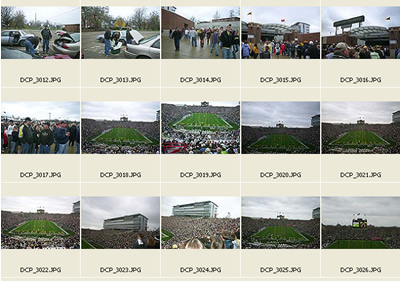
These are some photos I took at the IU vs. Purdue football game blowout last year. Let’s start to rename them now that you have seen a little snapshot of the file browser.
Step 1: Go up to your menus in the upper left, and choose Automate > Batch Rename
Step 2: You will see the below screen. The default option that you first see is to Rename in same folder. You also have the option to choose Move to new folder, with a browse button to find that destination. I am going to keep them in the same folder, and so should you for this example.
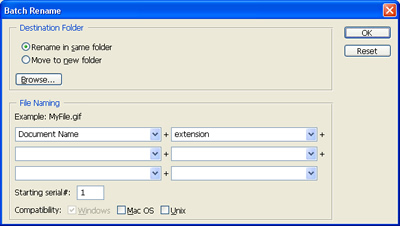
Step 3: Here is the scariest screen. This is very pragmatic if you have a technical kind of brain. Fortunately, Adobe steps you through this process fairly easily. As you change options here, you will see what your file will rename to.
In this case, I want my files to be named 05_IU_Purdue and I want them to increment with a two digit serial number. You will see each box has a dropdown of scary options. But don’t worry, over time you will adjust to these.
I happen to like underscores for my files, for Unix server type reasons, so in the second box I add an underscore to seperate my serial number incrementation, and then I end my file in a lowercase extension. The extension used will be the same as the type of file you have currently.
Take a look at my screenshot now with all of my information filled in.
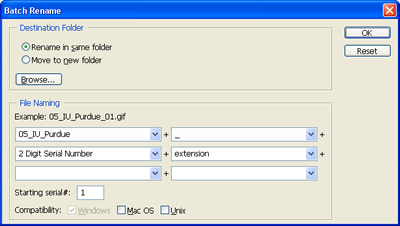
Step 4: After you have all of your own appropriate information filled in, hit “OK’ in the upper right and watch Photoshop work.
Now, I am aware that this option in some form was already available in Photoshop under File > Automate. But what I like about this, is that it cuts out one step. You will go to the folder you want to edit your images in, instead of selecting it from a file finder in the old way. This makes it much more visible and that is easier for me.
It would take me a lot longer to explain every option in the drop down menus, but most of them are pretty tell tale. Serial number is for just a regular number, and when you see one of the options in uppercase, that means that your output will also be in uppercase. Just watch your naming strategy at the top of the drop downs if you aren’t sure.
So now get busy, and take this power to rename all those old photos that are laying around, cluttering up your desktop.
How do I change the background matte color when working in Photoshop? How do I change the gray color in the gutter area of Photoshop?

Although I have never really cared before today, I did learn that you can change that ever so dull gray color that is around a image when you are working on it in Photoshop. If you don’t know what I am talking about, look at the image below, and that huge gray sea surrounding my working area.
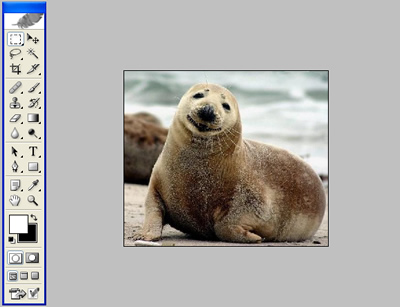
To change this, follow these two simple steps;
Step 1: Grab your paint bucket tool and change the color in the color squares from white to whatever you want the gray color to be instead.
Step 2: Zoom out so you can see plenty of gray space. Shift Click anywhere in the gray space to dump the new color in there instead. I am going to use a blue color to illustrate my purpose.
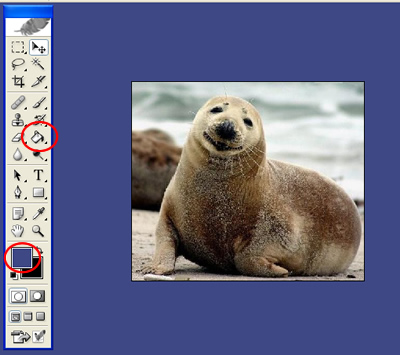
Normally, with the paint bucket all you have to do is click, the shift click is like a safety for you, the user, so that you don’t change the color accidentally.
I assume you know a little bit about Photoshop, but if you don’t know where your paint bucket and color selector tools are in your toolbar, I have circled them for you in the final example.
Thoughts on Wizard World Chicago
We’re back from the Windy City & I must say I’m still reeling from my fist time at an industrial sized gi-norm-i-con. I’ve made a pledge to use this forum to talk about things I like, but this might be a mixed bag. Not that I see this taking a negative turn, but my experiences there have provided quite a bit of fodder for rumination.
The trip begins
Jeff, Sarah & I arrived Friday night so we could join David (who had been there since Thursday) for an early start on Saturday. Sarah opted to yield to siren song of the Ikea store, so Jeff, David, the very charming Andie & I strolled through the doors around 8:30. Even during this “quiet” pre-opening time it was still bustling.
The DC booth was is the supreme attention grabbing spot – it was the first thing you saw the minute you entered & impossible to miss. “Booth” is an understatement too. Let’s call it the DC industrial complex. There were MANY tables & stations with different themes, give-a-ways & promotional events.
The front section near the door was devoted to several of these oversized corporate booths. Past them were the normal sized retailer & publisher booths. Then, over hill & dale, artist’s alley was all the way in the back.
Everyone drifted in separate directions. I thought I’d do a quick lap to get my bearings before the crowd descended. It was a good thing I said “hi” to some people early because I never found their tables again. That is either a comment on how Habi-trail like it was in there or on what a wretched sense of direction I have.
The announcement was made that the con was open for business and, in a flash, a jaw dropping mass of people flooded the hall & quickly formed a line of which I could see neither the beginning nor the end. This was the start of a game I played all day – “What’s everybody lined up for?”
Taking it all in
As a newbie tourist to the whole con scene this was a fascinating phenomenon to me. I imagine this was what it must have been like in the Communism’s heyday. People wandering around asking people in line what they were waiting for & hoping the end of the wait held that for which they were looking.
Seriously, I can’t imagine how anybody figured out how to get ANYTHING at this con. Here’s my first bit of commentary. This is only based on this one experience mind you – but WW Chicago overall seemed hopelessly disorganized. Oh, there were pockets of organization. There were several gentlemen at the DC booth who were consistently helpful, but overall I don’t know how the average visitor would have any idea when & where con events were occurring.
Thank goodness for David. He’s been to so many of these things he knows how to find out where to be & what the drill is. I feel sorry for anyone who goes to an event like this for the first time without a tour guide. I’m certain I would have missed out on all the signings without his guidance. At least at the smaller cons I found information easier to come by, event times & locations better marked & the staff much more informative & helpful.
Okay that was too close to negative for my tastes – let’s get back to the fun, cool stuff that happened. J. Scott Campbell…Eeeeeeee! That was my girl-squeal of excitement that I got to meet him.
My first ventures into buying comics were utterly random. J. Scott’s work was the first that I could actually pick out over other artists (no big surprise that Jim Lee was next) & awakened me to the idea of appreciating the individual creators. So meeting him was a huge deal for me.
The morning passed quickly with the majority of activity centered on getting to meet J. Scott. First we got wristbands that permitted us to line up to meet him. Yes, we waited in one line for the privilege of waiting in a second line – another big-con concept that was lost on me. I get that it keeps things orderly, but it was still weird.
We were close to the front of the second line so we got there fairly quickly. I gushed about how fabulous he was & asked him to sign two Danger Girls issues & a copy of his sketchbook that David had miraculously procured for me. The sketchbook was AWSOME! I read the thing like it was a novel – pouring over every page. It was a great experience. Good gosh I love his work!
As excited as I was it was nearly as much fun to step back & watch Jeff take his turn. Jeff can be an enigma. He’s a big goofy kid when you get to know him – but it takes some time & effort to get past his “coolness”. It was DELIGHTFUL to see him chatting so animatedly with this guy whose work we both admire. I got to witness a Jeff fan-boy moment – priceless.
How the time flies
Meeting J. Scott was truly about the only thing we accomplished before noon. David & Andie went to procure lunch & left Jeff & me to wander aimlessly – and that is a pretty accurate description of what I did. The sensory overload was mind numbing.
Even when I made my way out of the retail areas & to artist’s alley I had trouble finding folks because there was so much to see. I visited with some of my favorite guys.
Now hold onto you hats – I’m going to go all subjective here.
I got the feeling that a lot of these artists were as worn-out & (for lack of a better word) “shell-shocked” as I was. Take for example – I stopped by to chat with Stuart Sayger (Shiver in the Dark), Art Balthazar (Patrick the Wolfboy) & Bill Wilkison (Wha? & S.O.S). (Go give them money – they are marvelous!)
Based on past interaction, these three in particular are exceptionally funny, dynamic & I’d even go for flat out charming. All of them seemed more subdued than I recall and they weren’t alone. A lot of the creators had the whole penned veal aura about them.
And this is absolutely no reflection on the talented artists who were there – it seemed like a WW phenomenon. Here’s what a gleaned from my table to table chit chatting.
The atmosphere was the cause for many social behaviors
First, people were not spending. I can back that up. For me – it was a simple matter of it being back-to-school time so I brought almost nothing to spend. But that didn’t account for everyone. The crowded, cluttered environment was not at all conducive to shopping and browsing.
Case in point – Jeff was off agonizing about getting a fair trade on the books he brought so I told him I was going across the aisle to look at toys. That lasted all of ten seconds. The sizeable crowd made it difficult to navigate toward the booth. Then when I did make it near, the swirling sea of humanity that continued to ebb & flow on all sides made it nearly impossible to hold ground long enough to examine anything.
And if the experience of other attendees was similar to mine – I lost the whole morning to meeting one (fabulous, incredible) guy. That doesn’t leave much time for perusing.
The second hurdle for the artists was what appeared to be utter apathy from WW about taking care of them. I’m puzzling how to do this without sounding gossipy. The two common themes I heard were – disorganized & unhelpful.
It seems as though lack of information from WW made it difficult to find the right table in some cases. People were in the wrong spot, double booked or just giving up & setting up randomly. And without going into too much detail – WW’s treatment of Adam Hughes was nothing short of disgraceful.
The final drawback was competition for attention – there was so much to see that conversely there was so much to overlook. It was inadvertent, of course. I consider myself to be very disciplined, but even I felt all ADD. I couldn’t make it continuously down any aisle in a straight line, so I am certain there were many things I missed.
Continuing with the day
Well, enough of that – this grows over-long; let me round out the day. I stopped by the Desperado booth several times to visit their ever delightful creative director, April Doster. I also picked up the second issue of “The Atheist” which was probably my favorite title that I initially picked up from Desperado in Charlotte .
This book is penciled by John McCrea & written by the incomparable Phil Hestor. The writing in this is phenomenal. I’m already totally intrigued with the titular character. The story is smart & engaging. Oh & I can’t wait for issue two of Stardust Kid – another Desperado title that caught my interest.
Later in the afternoon we managed to snag wristbands that allowed us to stand in line to meet Alex Ross. I was completely unprepared too! I didn’t expect to have the opportunity to meet him. David came to the rescue once again with a cool Alex Ross postcard for him to sign. Mr. Ross was the perfect gentleman – very polite & gracious. I’m so glad we had the opportunity to meet him.
Then a mere 15 minutes before we were about to leave I ran across Eric Adams’ table – proving once again how crazy it was in there. I probably walked by that same space countless time & didn’t even notice his prominent banners until the crowd thinned a bit. But now I have issues 2 and 3 of “Lackluster World” – Yeah! I love the bold artwork & the cutting satire. I can’t wait for issue 4.
We rounded out the day with a leisurely dinner at a steakhouse across the street. It was nice to unwind after a packed day of activity.
So – overall impressions…
In retrospect, I can see that one day is probably not enough to see everything I wanted to see at a con this size. Next time I’d be curious to see if attending two or three days would dilute the feeling of being overwhelmed & the nagging sensation that I didn’t accomplish much of anything.
I think the keys words though are “next time”. I guess there will be a next time. Even though the smaller cons attract guys I idolize, I must reluctantly concede that playing on Wizard’s turf still may be the only venue I have for seeing some of the big name “stars” of the industry.
So I’m not totally keen on the idea – but I believe I will give it another go before I completely pass judgment. After all it WAS a comic convention – how can you not have some fun. It’s always a pleasure to have an opportunity to make new friends and interact with the nice folks we’ve already met.
It was so much easier to write about other cons I’ve attended this year. I cannot WAIT to go back to Mid-Ohio or Heroes con! But I think a little Wizard World is going to go a long way for me.
Maybe I’m biased too – I’m always rooting for the little guy. So I’ll probably be saving my time & money to support them over them over this leviathan of a con.
Thanks for listening!
Cinderella Man (2005)

I am the type of viewer that the big studios dream about. This movie made me cry, I got wrapped up in the heroically slanted story, the little guy vs. the big guy during the worst time in America, the whole bit.
Russell Crowe plays James Braddock, who after breaking his hand and being finished, banned from boxing, manages to rise to the top. Old and tired, Russell Crowe looked every bit the part, battered, beaten up, and just tossed around by life. But he wins three fights over boxers younger and bigger than him. Not gracefully, sometimes punch by punch, but he does it. Then in the end, he beats the big cocky, psuedo boxer of a man Max Baer, who spends more time strutting around the ring and swinging huge rights than actually dancing like a boxer should and trying to actually fight.
Everyone should see this movie. Renee Zellwegger does a decent job, but I think I am about all out on her squinty, beaten down girl part. Paul Giamatti is fantastic. He is the coach that you want in your corner, and the guy that once he started to believe in Braddock again, didn’t let him down. Don’t forget the huge brute who plays Baer, Craig Bierko, the most familiar looking giant you’ve never heard of and has never been in anything notable.
Ron Howard knew how to make this story about fighting for something bigger than yourself, and you will leave wanting more.
Get Shorty (1995)


This is the second time I saw this movie, and I liked it better this time.
Kind of random, John Travolta is a Shilok, who is hunting down a target in Hollywood, when he gets into the throw of the movie business. As he meets different people trying to find his target, from Gene Hackman (B-Movie Director), Rene Russo (B-Movie Actress), to Danny Devito (Big time actor), he slowly becomes intertwined with local extortion and other shady dealings.
But it isn’t a heavy movie. It is very light and really funny with a ton of attitude. John Travolta is trying to intimidate people, and most of the time it works, but he is surrounded by people, who live in the movie capital of the world who have no cajones. Sarcastic, and a little campy, there were some extremely funny parts in this movie.
But it isn’t something I would recommend to people to watch a lot of times. There is only so much of the “Italian Gansta” type of talk that one person can take.
But to see John grab an ex-stuntman by the crotch and throw him down a flight of stairs is pretty humorous.
Comic Store : W. Michigan Comic Connection
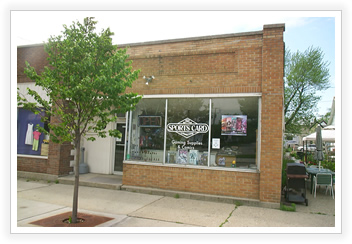
Location : Grand Haven, MI
I went into this comic store soon after I started collecting for my first pass in the sixth grade. They would have great sales on books I was looking for, and the whole experience was generally upstanding. But I was young, and at the time, two chronic smokers that were in their 120’s didn’t bother me. The store moved within one strip mall four times, and I grew tired of the old owners.
Eventually the store was bought out by two other guys. They are two individuals who treat their customers like they don’t need the business. I had orders that were not fulfilled, without a explanation as to why or a notification that I wouldn’t be getting my books, and they ran the store with the idea that every person in the universe loved role playing games with figures. I know that comic stores can be a little quirky, but do believe customer service should come first, and here it comes last. It is truly a store owned by two guys living their dream, and their dream is to try to make money playing with tiny painted characters all day long, and ignore everyone else from the genre. Not good business sense.

